Option 1: Main Router + Additional Router (AP or Extension Mode)
- You’ll need an extra router configured in either Access Point (AP) mode or Extension/Bridge mode.
- It uses the same network settings as the main router (same SSID and IP range).
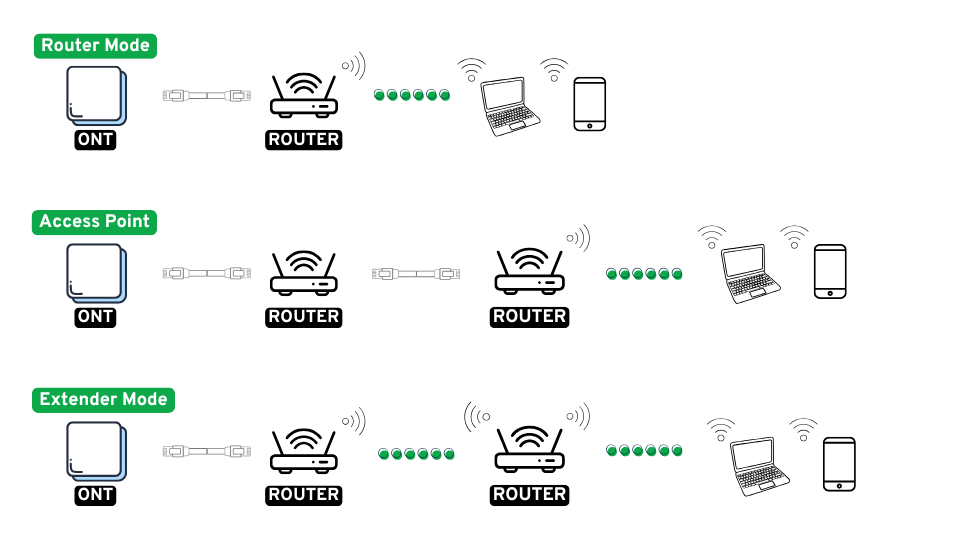
① Router Mode
- Purpose: Used as the main router connected directly to the internet (e.g. ONT → Router).
- Connection:
- ONT → Router’s WAN port
- Devices connect via Wi-Fi or LAN ports
② Access Point (AP) Mode
- Purpose: Extends an existing wired network with additional Wi-Fi coverage.
- Connection:
- Main router LAN port → Sub router LAN port (Do not use the sub router’s WAN port)
- Connected via Ethernet cable (up to 100 metres), sub router does not need to be within Wi-Fi range of the main router.
- Features:
- Disables NAT and DHCP (main router handles IPs)
③ Extender / Repeater Mode
- Purpose: Wirelessly extends Wi-Fi signal to areas with weak coverage.
- Connection:
- Sub router connects to the main router via Wi-Fi
- Repeats the wireless signal
- Features:
- Acts as a wireless repeater or bridge
- No cable needed (but wireless backhaul may reduce speed)
Option 2: Main Router + Wi-Fi Range Extender
- The range extender must be placed within the Wi-Fi signal range of the main router.
- It connects to the main router wirelessly.
- It uses the same network name (SSID) and IP range as the main router.
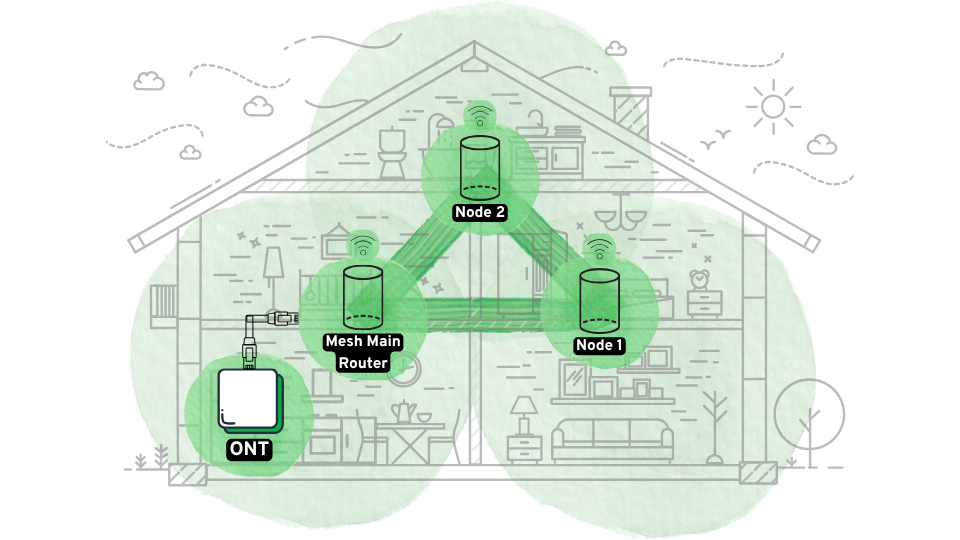
Option 3: Mesh Router System (Recommended!)
- Usually comes in packs of 2 or 3 units, with one acting as the main router and the others as satellites.
- The main router connects to the ONT (fibre modem), and the satellites should be placed within range of the router or each other.
- Mesh nodes automatically connect and sync, so once set up, no further configuration is usually needed.
- Great for big houses or Wi-Fi dead zones.
Option 4: Main Router + Powerline Adapter
- Powerline adapters send internet signals through the existing electrical wiring.
- Connect the main router’s LAN port to one adapter, then plug the second adapter into a power socket in the area where Wi-Fi is needed.
- Both adapters must be on the same electrical circuit (e.g. same fuse board or main switch).
- No need for long Ethernet cables, even over long distances.
- You can either clone the main router’s Wi-Fi name and settings, or create a new SSID for the powerline device.