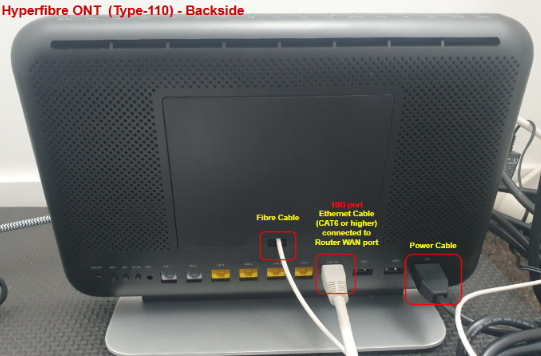
The image below shows a typical Hyperfibre setup with key components labelled for reference. This guide helps with identifying which device to reboot and which one should not be touched during troubleshooting.
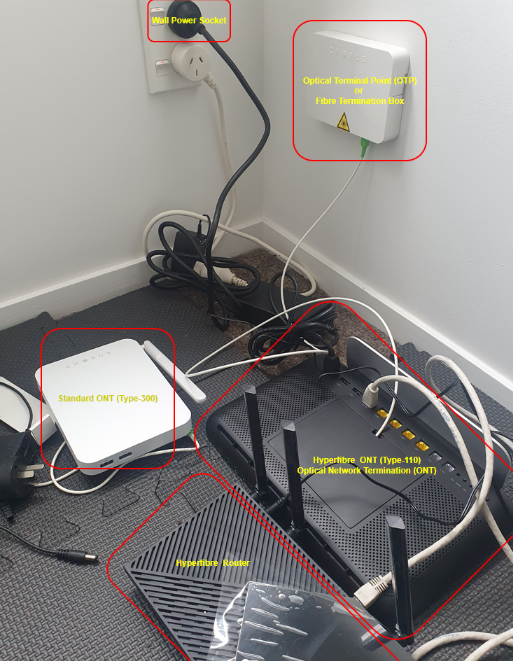
Key Components:
1. Wall Power Socket
- Powers the ONT and router
- If the ONT is unresponsive, check here first
2. Optical Terminal Point (OTP) / Fibre Termination Box
- This is a passive termination point for the incoming fibre
- Do not unplug or attempt to reboot this
- No power connection
3. Standard ONT (Type-300) – White Chorus box
- Older/standard ONT model for broadband connections
- May be used in fibre setups rather than Hyperfibre
4. Hyperfibre ONT (Type-110) – Black unit with yellow ports and antennas
- Converts fibre signal to Ethernet for high-speed Hyperfibre plans
- This is the device you should reboot when troubleshooting Hyperfibre
5. Hyperfibre Router – TP-Link router
- Distributes internet to devices over Wi-Fi and Ethernet
- Connected to the ONT’s 10G LAN port