
On the phone, go to Menu > Status > (network)> IP (IPv4) Address and note the IP address in the format 192.168.xxx.xxx.
On your computer, open a web browser such as Chrome or Edge, and enter the IP address into the address bar.
When the login screen appears, enter the following credentials:
- Username: admin
(If you have changed the username previously, please use your updated login credentials.) - Password: admin
(If you have changed the password previously, please use your updated login credentials.)
After logging in, navigate to the Account tab in the top menu.
Enter the following details:
- Register Name: {Phone Number}
- Username: {Phone Number}
- Password: {Unique password provided by your ISP}
- Server Host: sip.feenix.co.nz
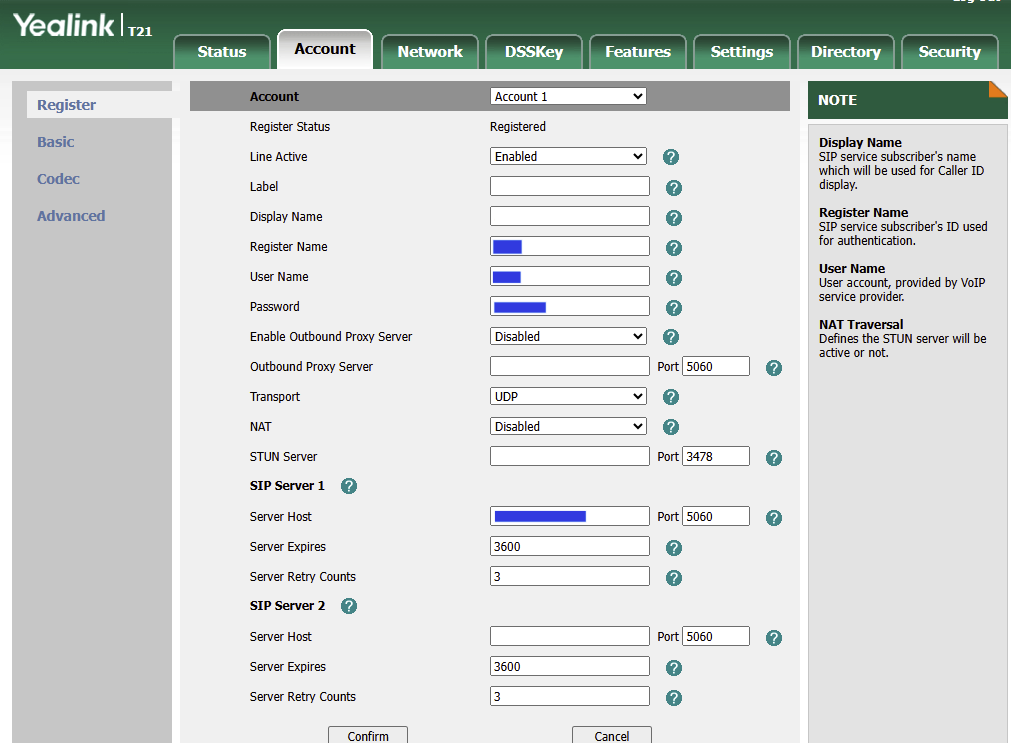
Once all the information is entered, click the Confirm button to save the settings.
Finally, test the phone by making and receiving a call. If both work correctly, the setup is complete.